Introduction
Many beginners enter the crypto market with excitement, only to feel overwhelmed by the technical jargon surrounding asset storage. When you buy crypto, you are essentially purchasing a digital entry on a public ledger called a blockchain. Without a clear understanding of how to “hold” or access that entry, you are vulnerable to risks like exchange hacks or losing your credentials. This blog serves as your roadmap, cutting through the noise to help you understand the core mechanics of ownership. We focus on practical, actionable knowledge that empowers you to take control of your financial journey rather than blindly following trends. Whether you are a small business owner, an investor, or simply a learner, this guide ensures you avoid common pitfalls.
Understanding Crypto Wallets in Simple Words
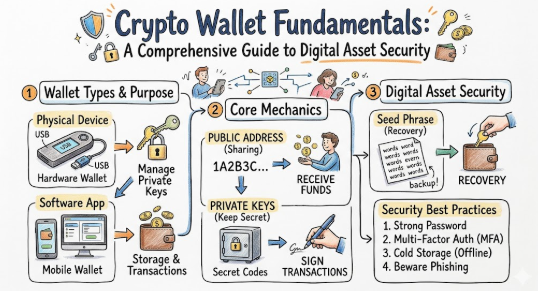
A crypto wallet is not a physical purse that holds coins; it is a digital tool that manages the cryptographic keys you need to interact with the blockchain.
- The Concept: Think of a wallet as a digital gateway. It holds a Public Key (like your bank account number, which you share to receive funds) and a Private Key (like your secret PIN or password, which you use to authorize spending).
- The Reality: Your actual funds live on the blockchain network itself. The wallet simply provides the “signature” required to move those funds. If you lose your private key, you lose your ability to move your assets, effectively locking them away forever.
Why Using the Right Wallet Is Important
Your choice of wallet defines your level of risk and control. Using a wallet that doesn’t align with your needs can lead to poor financial discipline or exposure to avoidable scams. Proper wallet management encourages long-term discipline, protects you from exchange failures, and ensures that you are the sole authority over your wealth. Whether you are holding for the long term or trading frequently, your wallet choice is the foundation of your investment security.
The Real Problem Readers Face With Crypto Storage
The core challenge isn’t just “which wallet to pick,” but the lack of foundational knowledge. Beginners often rely on exchanges for everything, unaware that if the platform fails, they might lose access to their assets. Alternatively, some dive into self-custody without understanding how to back up their recovery phrases, leading to permanent losses. This confusion is compounded by conflicting advice online and the fear of missing out (FOMO) that drives people to bypass essential security steps.
How a Crypto Wallet Works Step by Step
- Key Generation: The wallet generates a pair of keys—a public key and a private key—using complex mathematics.
- Address Creation: The public key is compressed into a readable address (e.g.,
1A1zP1eP...). This is what you share. - Authorization: When you send crypto, the wallet uses your private key to “sign” the transaction.
- Broadcast: The signed transaction is sent to the blockchain network.
- Verification: The network validates the signature and updates the ledger to reflect the new ownership.
- Confirmation: The transaction is recorded in a block, and the balance in your wallet updates.
- Common Mistake: Sharing your private key or seed phrase with others.
- Better Approach: Treat your seed phrase as a sensitive document. Store it physically in a secure, offline location.
Key Factors That Influence Your Wallet Choice
- Security: Does it allow offline (cold) storage?
- Convenience: How fast can you access funds for trading?
- Control: Do you own your private keys (non-custodial)?
- Asset Support: Does it support the specific coins you own?
- Backup/Recovery: How easy is it to restore if you lose your device?
Detailed Breakdown of Digital Asset Custody
Custodial Wallets
These are services (usually exchanges) where a third party manages your private keys.
- Pros: User-friendly, password recovery available.
- Cons: You don’t have total control; if the exchange is hacked or freezes accounts, your funds are at risk.
Non-Custodial Wallets
You hold the keys. You are the sole custodian.
- Pros: Complete control, no third-party reliance.
- Cons: High responsibility. If you lose your seed phrase, your money is gone.
Common Mistakes Beginners Make
- Storing Large Amounts on Exchanges: Exchanges are targets for hackers.
- Ignoring Hardware Wallets: Leaving significant savings in “hot” (internet-connected) wallets.
- Digital Backups: Saving recovery phrases in screenshots or emails.
- Phishing Victims: Connecting wallets to untrusted, malicious websites.
Don’t Do This Checklist:
- Never share your 12-24 word seed phrase with anyone.
- Never take a screenshot of your recovery phrase.
- Don’t use a “hot” wallet for your entire life savings.
- Don’t ignore firmware updates for your hardware wallet.
Practical Real-Life Examples
- The Investor: Someone who buys Bitcoin for long-term growth and transfers it immediately to a hardware wallet to avoid exchange risk.
- The Trader: A user who keeps a small amount in a software wallet for frequent swaps, keeping the bulk of their funds in cold storage.
- The Learner: A beginner who creates a small “experiment” wallet to learn how transactions work before moving larger sums.
- The Security-Conscious User: A person who stores their recovery phrase on a physical, fireproof metal plate rather than a piece of paper.
- The Careful User: Someone who verifies every transaction address carefully, triple-checking the characters before clicking “confirm.”
Two Useful Tables for Better Understanding
Table 1: Hot vs. Cold Wallet Comparison
| Feature | Hot Wallet (Software) | Cold Wallet (Hardware) |
| Connectivity | Always online | Offline |
| Security Level | Moderate | High |
| Best For | Frequent Trading | Long-term HODLing |
| User Friendliness | Very Easy | Requires setup |
Table 2: Wallet Security Checklist
| Risk Area | Common Mistake | Better Approach |
| Keys | Saving on phone/email | Physical paper/metal backup |
| Access | Weak passwords | Use strong unique phrases |
| Connection | Connecting to unknown apps | Use a “burner” wallet for DApps |
| Backup | Single copy | Multiple secure locations |
Tools, Methods, and Frameworks Readers Can Use
- Hardware Wallets: Devices like Ledger or Trezor for cold storage.
- Multi-Signature Wallets: Require two or more signatures to move funds; great for shared accounts.
- Watch-Only Wallets: A way to monitor your portfolio on your phone without exposing your private keys.
Expert Tips to Make Better Decisions
- Start Small: Always test a wallet with a tiny amount of crypto before moving your main holdings.
- Verify Addresses: Address spoofing is real. Always double-check the first and last few characters of an address.
- Use Different Wallets: Don’t keep all your eggs in one basket. Use one wallet for DeFi, another for long-term storage.
- Stay Updated: Keep your wallet app and device firmware updated to protect against known vulnerabilities.
- Read Terms: Understand the custodial agreements of the platforms you use.
Case Studies: How Better Understanding Changes Decisions
- Case 1: A user lost their life savings because they saved their seed phrase in a Google Doc. Hackers gained access to their email and drained the wallet. Lesson: Never store keys digitally.
- Case 2: An investor lost access to a large amount of crypto because they forgot their password and had lost the paper backup of their recovery phrase. Lesson: Always verify your backup process immediately.
- Case 3: A trader lost funds by connecting their wallet to a “fake” decentralized exchange. Lesson: Always check the URL and project legitimacy.
Risk Awareness: What Readers Must Check First
Understand that the crypto space is largely unregulated. There is no “forgot password” button for your non-custodial wallet. Cybersecurity risks, including phishing, malware, and social engineering, are prevalent. Always perform your own due diligence before trusting a platform or wallet provider.
Checklist Before Taking Action
- Research the wallet provider’s reputation.
- Confirm you are in a non-custodial environment.
- Have a physical, offline backup of your seed phrase.
- Test the recovery process with a small amount of crypto.
- Enable 2FA on any associated exchange accounts.
- Understand the network fees before confirming transactions.
Strategic Insights for Better Decision-Making
Managing digital assets is about balancing risk and accessibility. If you are an active trader, accept the higher risk of a hot wallet for the sake of speed. If you are a long-term investor, prioritize the security of cold storage. By separating your “spending money” from your “savings,” you minimize the potential damage from a single security breach.
Key Terms Explained for Beginners
- Private Key: Your digital signature that authorizes transactions. Keep it secret.
- Public Key: Your public address for receiving crypto.
- Seed Phrase: A list of 12–24 words that acts as a master key to your entire wallet.
- Hot Wallet: A wallet connected to the internet.
- Cold Wallet: A wallet kept offline, usually a physical device.
- Blockchain: The decentralized ledger where your transactions are recorded.
- KYC: Identity verification processes used by exchanges.
Who Should Read This Blog
This guide is essential for beginners starting their crypto journey, students interested in blockchain technology, salaried employees looking to diversify their savings, and anyone wanting to move their assets off exchanges for better security.
Frequently Asked Questions
- What is a crypto wallet? It is a digital tool that manages your private and public keys to interact with the blockchain.
- How does a crypto wallet work? It acts as an interface that signs transactions using your private key so the blockchain can verify them.
- Is it safe to keep my crypto on an exchange? Generally, no. It’s better to use a non-custodial wallet for long-term holdings.
- What happens if I lose my seed phrase? If it’s a non-custodial wallet, your assets are permanently lost.
- Can I use a hardware wallet for all my coins? Most support a wide range of assets, but always check compatibility first.
- Why do I need a wallet? To maintain control and autonomy over your digital assets.
- Are software wallets safe? They are convenient but less secure than hardware wallets because they are online.
- What is a custodial wallet? A wallet where a third party (like an exchange) holds your keys for you.
- How often should I back up my wallet? You only need to back up your seed phrase once, but store it in multiple secure places.
- Can I have multiple wallets? Yes, it is recommended to separate your assets.
- What is a gas fee? A small payment to the network to process your transaction.
- What should I do if I suspect my wallet is hacked? Immediately transfer remaining funds to a new, secure wallet.
Conclusion and Next Steps
Managing a crypto wallet is a fundamental skill in the digital age. By moving from a state of confusion to one of informed practice, you protect your assets and build confidence in your financial decisions. Remember, the goal isn’t just to “have” crypto, but to manage it responsibly. Start by choosing a reputable, non-custodial wallet for your long-term needs, secure your recovery phrase offline, and always maintain a healthy skepticism of “too good to be true” offers. The path to security is one of patience and discipline.